
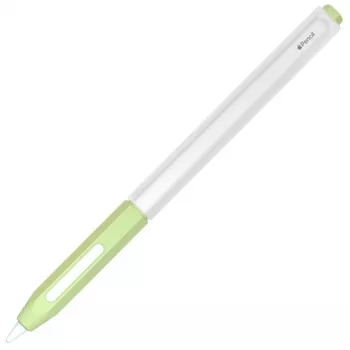
A slim jelly cover can make an Apple Pencil easier to hold for long notes, sketches, and precise edits. A soft-touch, non-slip layer changes how the pencil sits in your fingers, how confidently you can place small strokes, and how likely it is to roll off a desk when you set it down. Below is a practical guide to what a non-slip jelly cover changes in daily use, how it fits into common iPad workflows, what to check before buying, and how to keep the grip feeling consistent over time.
An Apple Pencil is designed to be sleek, which is great for aesthetics but not always ideal for long sessions. A jelly cover adds subtle friction and softness that can make the pencil feel more secure without changing how your apps work.
This is especially noticeable in scenarios like fast classroom note-taking, long study sessions, or detailed markup work where repeated grip adjustments can slow you down.
Before choosing any cover, it’s worth confirming your Apple Pencil model and how you charge it. Apple Pencil generations differ in dimensions and charging methods, and those details matter when you add even a thin layer around the barrel.
If you’re unsure about pairing or charging behavior for your specific iPad and Apple Pencil combination, Apple’s support pages are a reliable reference: Apple Support — Use Apple Pencil with iPad and Apple Support — Pair and charge Apple Pencil.
Not all “non-slip” covers feel the same. Small changes in thickness and texture can make the Apple Pencil feel either more natural or more cushioned, depending on how you hold it and how long you use it at a time.
| Feature | What it affects | Best for |
|---|---|---|
| Tacky non-slip texture | Reduces slipping and improves control | Note-taking, handwriting, precise edits |
| Thinner profile | Keeps original size and fits more holders | Minimalists, tight pencil loops |
| Slightly thicker cushion | Improves comfort and reduces finger pressure | Long study sessions, heavy daily use |
| Anti-roll behavior | Helps stop desk rolling and drops | Busy desks, classrooms, cafés |
| Easy-clean material | Less staining and better long-term feel | On-the-go users, shared devices |
Most real-world Apple Pencil setups involve an iPad case, a pencil loop, or magnetic storage. A cover can improve handling, but it also adds a small amount of diameter—so it’s smart to check your accessories for clearance.
If the goal is a steadier hold with less rolling and better day-to-day comfort, the Non-Slip Jelly Cover for Apple Pencil is a simple upgrade that doesn’t change your tip, apps, or drawing tools—it just makes the pencil easier to manage in your hand.
It can, depending on the cover’s thickness and how precisely it fits. A snug, thinner cover is less likely to interfere, and it’s best to test magnetic attachment and charging on your specific iPad model right after installing.
It changes grip in your hand more than friction on the screen. Writing feel is still mostly determined by the tip condition, any screen protector, and your app’s brush or stabilization settings.
Use mild soap and water as needed, then dry it thoroughly with a microfiber cloth before putting it back on. Avoid harsh chemicals, and remove lint with low-tack tape; occasionally cleaning under the cover also helps prevent trapped dust.











Leave a comment